Edge Screen - Edge Gesture
Access your favorite apps, contacts, calendar, notes, and productivity tools instantly with a simple edge gesture. No more endless tapping through menus – just swipe and go.
Powerful Features That Save You Time
Access 12+ Tools Instantly
Open apps, check your calendar, use the calculator, compare world times, view notifications, and access files – all from one customizable sidebar. Everything you need is just one swipe away, no matter what you're doing on your phone.
Call Contacts in Seconds
Add your most important contacts to the edge panel and call them directly with a single tap. Skip the phone app entirely and stay connected with family, friends, and colleagues faster than ever before.
Your Productivity Hub Anywhere
Never miss appointments with quick calendar views, jot down notes on the fly, do quick math with the built-in calculator, and keep important files within reach. Stay organized and productive without switching between multiple apps.
Make It Yours Completely
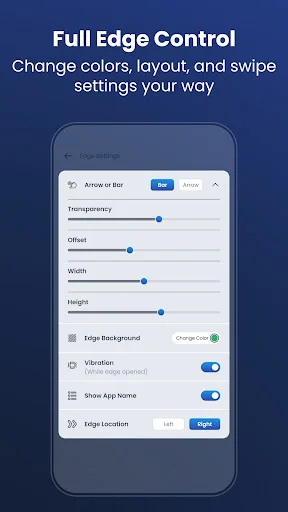
Choose exactly which tools and features appear on your edge panel. Build the perfect sidebar that matches how you use your phone, with your most-used apps, favorite contacts, and essential tools right where you want them.
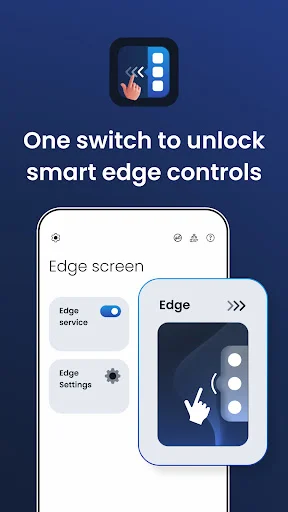
With Edge Screen - Edge Gesture, you can personalize and create your own edge screen for your phone. It also offers many features like you can add a contact to make a call directly from edge screen or you can direct do a math function on edge screen calculator. And you can compare time using World Clock or open website in one go. All these features can be done in just one click.
Set daily Alarm and a quick look at calendar events just by using sidebar which opens with a gentle sliding edge gesture.
You can also add notes directly to the edge and even add important documents or any files to edge for quick access and do direct action.
Which Edges can be added in the Edge sidebar:
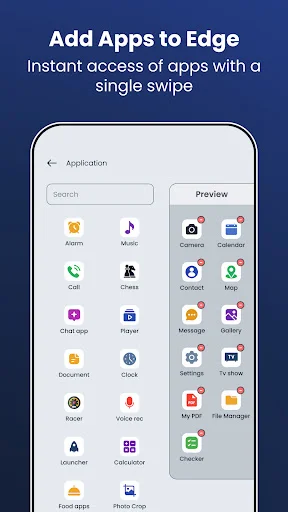
- Application
- Contact
- Calculator
- World clock
- Quick setting
- Browser with URL
- Alarm
- Social apps
- Calendar
- Notifications
- Files
- Notes
Features
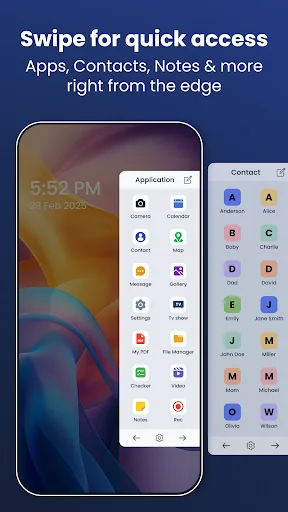
Application - Just add your favorite application or most used application in this edge and open that from wherever you want by just sliding sidebar and clicking the app icon.
Contact - Add frequently contacted person numbers here. Those can be your parent, best friends or loved ones
Calculator - A simple calculator helps you do some math calculation.
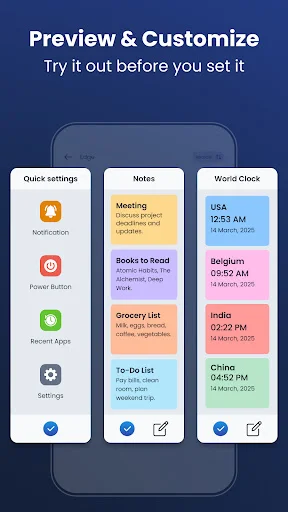
World clock - A world clock is a clock which displays the time for various cities around the world so here we can add clock and compare time easily.
Quick setting - Some device-related setting like lock phone, power button, quick setting and many more.
Browser with URL - Open browser with the desired URL and also user can add his/her link and access it.
Alarm - Set the hour and minute for the alarm clock. The alarm will appear and the default sound will be played at the set time.
Social apps - We will pick some social apps from all of your apps and group it out for you to quick access your social on the go.
Calendar - Import all the events from your calendar and display it with time. So you won't miss your schedule anytime.
Notification - View your phone's notifications directly from the edge panel.
Notes – Add and view your notes from the edge screen anytime.
Files – Keep your important files on the edge for quick access.
Disclosure
This app uses the Accessibility Service API to enable the edge panel and perform actions from it, based on the user's preference. We do not collect or store any personal data. This permission is used only to enable app features set by you.
Permissions
- Read contact - We require this permission show your selected contacts on edge panel so you can add it to sidebar panel easily.
- Phone call - We require this permission to call the person user had added in the edge panel.
- Calendar - We require this permission to read event from your calendar and display in the edge panel.
- Notification service - We require this permission to show notification in edge panel.
- Accessibility service - We require Accessibility service to enable edge and allow user to perform some functionality like show notification panel, Perform power button action, accessing recent apps, Open quick settings etc.
Download now and get edge panel for daily use!
See How Simple It Really Is
Loved by Over 100,000 Users
Great app all phone setting is in one place users can control full access and manage full phone settings by one or two fingers can found and call his favorite contacts just a second. Call, massage, whatsapp, setting, notes reminder, alarm, volume, all apps controlled on screen. Even a beginner can operate easily perfectly make a great app. Samsung galaxy gives in build has phone.
Have been using this app for sometime now it work perfectly its the best of all edge gesture i advice u download and be happy
it he)ps me find my apps faster and it can change apps faster then before
The best experience ever...
this is very interesting
excellent sidebar