
Text Expander - Texpand
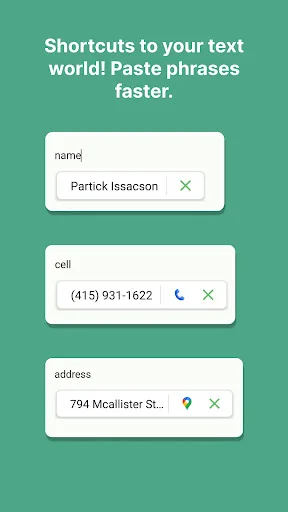
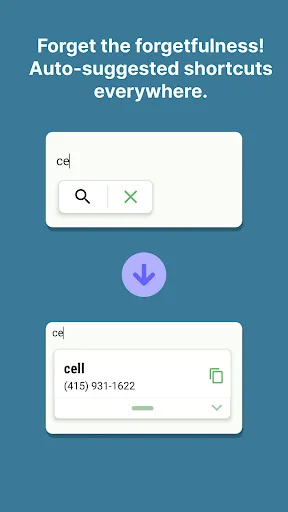
Turn long phrases into simple shortcuts. Type a few letters and watch your full text appear instantly – perfect for addresses, emails, and any text you use daily.
Why You'll Love Texpand
Type Less, Say More
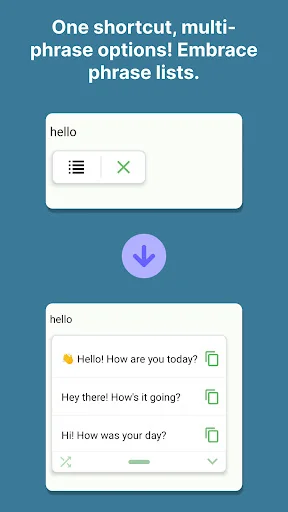
Create shortcuts for any phrase you type often. Just type a few letters and your complete text appears automatically. Save hours every week by never typing your email signature, address, or common responses again.
Smart Dynamic Content
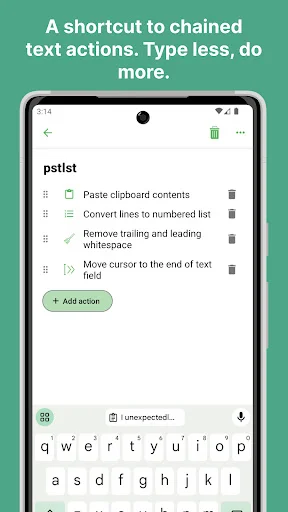
Add automatic dates, cursor positioning, and clipboard content to your shortcuts. Perfect for emails that need today's date or messages that require custom information every time you send them.
Express with Images
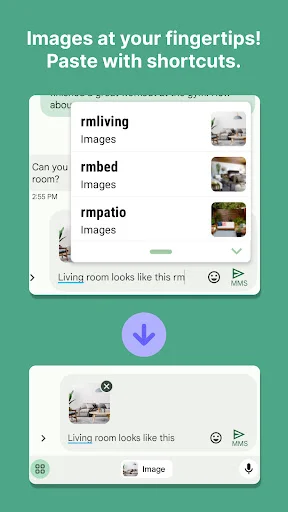
Attach images and GIFs to your shortcuts for faster visual communication. Type a quick code and send the perfect reaction GIF or frequently used image in seconds.
Never Lose Your Shortcuts
Keep your shortcuts safe with Google Drive backup and export them as CSV files. Switch devices or share your favorite shortcuts with teammates without losing any of your work.
Texpand: Text Expander – Easy Media Fun!
Have you ever tried to type out a long home address only to find out the text is just way too repetitive? It is really amusing to see how a simple tool can actually take those heavy words and make them short in seconds. Texpand: Text Expander is built for those times when you need to save effort on your device. You keep your full sentences but the physical work is just better.
Efficiency Magic Features
- Texpand: Text Expander for quick phrase shrinking
- Textpand: Text Short Cuts for easy sentence extraction
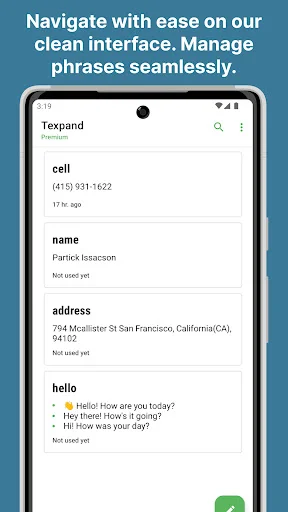
- Dynamic list view for storage
- Google Drive backup for final touches
- Variable integration for easy listening
- CSV file export for mobile files
- Fast results for every single person using it
- Simple backspace undo for all your daily typos
How to best enjoy your Textpand: Text Short Cuts!
Life moves fast and honestly it is just nice to have a way to turn a long paragraph into a simple abbreviation without any stress at all. Using the Texpand: Text Expander to fix your library or even to clear up your typing is fun and is streamlined. Users of this tool have fun with the results. People using the software see their new text appear instantly. It is that simple to use the Textpand: Text Short Cuts.
Shrink and Save
With the Texpand: Text Expander, magic feels as if it can occur on your screen while the app processes the abbreviations. In just seconds, the software makes the typing much lighter for sharing. All you have to do is type the code and let the software do its magic. This helps settle those moments when your fingers are completely tired. Perfect results become possible with the smart mode, activated within the Texpand: Text Expander.
Beyond Basic Swaps
The variable integration feature has great benefits for your creative projects. It even helps you with high quality edits like cursor positioning or clipboard content. Using the built-in system, you can pick between adding a date or chaining multiple actions. It does the heavy lifting so you can focus on the content. Users of the software have a great experience.
Sound and Vision
The image attachment tool is best shown off when you need to grab a specific gif for a message. Check the output screen so you can see your new high quality expansion ready to send. It is a great way to stay organized. The results are often surprising for the speed of expansion. Users like to see the results right on their own devices. The software really makes the typing feel very fast.
Daily Editing Power
What differentiates this Textpand: Text Short Cuts from others is the way it handles almost every text field. Within the tool, you can find a way to fix a clip from an old note. It is that little extra piece of functionality that helps the Textpand: Text Short Cuts stand out. Users like the easy navigation. They really like how the software keeps their media ready.
Start Enjoying Texpand: Text Expander Today!
Fixing your typing should be quick! This app is all about quick swaps and fun ways to manage your phrases while you are busy. Enjoy the software and have fun with what the technology does for your phone. Go ahead and download the tool now. Experience the final results on your own phone today.
Texpand uses Accessibility API to detect whether a saved shortcut is typed and replace it with a corresponding phrase.
See How Easy It Works
Join 500,000+ Happy Users
If your device doesn't have a text shortcut feature as part of the standard keyboard, give this one a try. It has enough options to fulfill Ur basic needs, and there's a pro($$version)but I get by with the standard one. Especially useful if you're doing a lot of chatting, for greetings, descriptions, or asking the same questions repeatedly, but want to save time without relying on your keyboard's predictive text function. Faster than copy/paste. Easily integrated into my hotbar + accessabilitys
This is an AMAZING tool. Accessing this kind of technology would have cost thousands of dollars a few years ago, and now I can have the premium version for the cost of a couple cups of coffee. What a world! Based on some reviews, I was worried about my ability to use this app to autofill on my phone, but after a small amount of set-up, I have it running and it and is simple to use. Sounds like my phone might shut it down sometimes, but if that is my biggest challenge, I'll still be delighted!
I use Quick Parts in MSOutlook on my laptop to insert standard paragraphs for emailing customers for my party business. Discovering Texpand means I can now do the the same from my phone when I'm out and about. Better still, it enables me to reply to text, WhatsApp and Facebook enquiries too. It's always there when I need it, but it never gets in the way when I don't. The app is a real timesaver - I rarely write reviews, but I love what it enables me to do & the free version is enough for me.
Thanks for making this so great and better every day . Now since it supports import export 👏 I can't wait to move off AHK keyboard. Don't get me wrong. AHK keyboard saved me for all those years but it doesn't been updated and the AHK keyboard which is mandatory for expansion just sucks. Texpand allows me to use any keyboard. That said it is even more user-friendly thank what pontentially TextExpander could be but those folks are unfortunately not interested in Android. So really big thanks.
I rarely write reviews. Most now push you before you have even checked out the app. It's ridiculous! This one doesn't. The free version doesn't bombard you with ads, and does exactly what it says. They continually update, you can flash anything, or backup. Not being a computer wiz, it's an easy app, straight forward. Tried a bunch, this one is easiest to keep routine phrases and lists. I haven’t even tried the advanced stuff, and its been over a year. So yeah worth trying. I bought it.
OMG: Texpand saves me quite a bit of time every day with entering repetitive text: grocery lists, multiple email signatures, annoying punctuation and symbols (e.g., etc., ∆, ⋮ , ...), auto-entering dates in multiple formats, words I usually misspell. It will even enter a phrase or set of symbols with the cursor set exactly where you want it. It is well designed, with a shallow learning curve, and easy-to-use functionality. One of my favorite productivity apps.